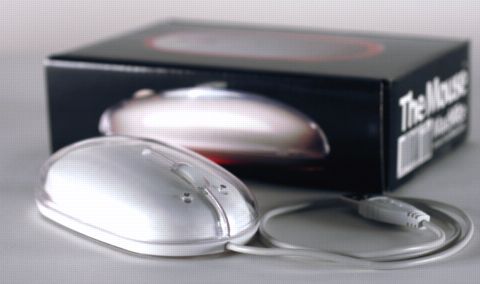
 It came today. My new The Mouse from MacMice.com. It's a three button wheel mouse that looks just like the Apple Pro Mouse.
When I first took it out of the box I was thinking that this is a great looking mouse. It looks just like the Apple mouse except that it has a split down the middle where the two buttons are.
Next was the mouse cable. I noticed that it was not very long and I am worried if it's long enough to make it to the USB port on my monitor. I wanted to plug it in there because with my old mouse I kept hitting the USB plug with the mouse. See I use the mouse on the left side of the keyboard and the ports are on the right side. Anyway, I plugged it in and it had plenty of cable. Not too much mind you. Just right.
After plugging it in, that's when things changed. It has very fast tracking. Way too fast for me. So I went into the preferences panel and lowered that. Then I had a problem with the buttons. I'm a left handed mouse user so I need to swap the buttons. The Mouse does not come with software in the box and Mac OS X does not have support for swapping the buttons. I went to their web site and downloaded their drivers. I had to reboot the system for them to be loaded into the Kernel. When the system booted up, the mouse was in over drive. Super fast. I think Jane would like that. She says that her mouse is too slow. Anyway, I change the preferences and now the tracking speed and buttons are fine. All set.
Next problem. The mouse feels funny. I'm not used to the two buttons any more. When I click, I end up clicking both of them. It's easy to do with this mouse. The top of the mouse is loose also. Seems like it's going to fall off. I solved this with pushing the top down against the base and it smooshed together. Now it feels fine.
This mouse is a lot lighter than the Apple mouse. Feels like there is nothing there. I kinda like a heaver mouse myself, but I guess I'll get used to it soon. The other thing is I still keep pressing both buttons at once. I guess with a bit more training I'll get used to that also.
I'll give it a few weeks to see if I like it. I do like that it has the three buttons and a wheel. I like the wheel, especially when surfing web sites. The right button (left in my case) is great for pulling up menus without having to use the keyboard.
Anyway, my score currently is a 5 out of 10. Check back next week.